
EHR Integration for AI Receptionists: The Technical Buyer’s Guide (2026)
The complete technical guide to EHR/EMR integration for AI medical receptionists — bidirectional sync, API vs screen scraping, multi-location scheduling, CRM automation, and 30-60 day rollout.

Why EHR Integration Is the Make-or-Break Factor
You’ve evaluated the AI receptionist. The demo looked great. The ROI calculator checks out. But then the technical question lands: how do you execute EHR integration for AI receptionists without breaking existing clinic workflows?
Modern clinics must integrate no-show recovery directly with their overall front desk automation operations to prevent schedule leakage.
This is where 60% of deals stall — not because the AI can’t deliver, but because the integration story is vague, risky, or requires months of IT resources you don’t have.
The reality: An AI receptionist without deep EHR integration is just a very expensive answering machine. It can’t book in real time. It can’t verify insurance. It can’t prevent double-booking. It creates more work for your front desk, not less.
This guide is for the technical buyer — the practice manager, IT director, or clinical lead who needs to know exactly how integration works, what the risks are, and how to implement without disrupting operations. No marketing fluff. Just architecture, data flows, and implementation reality.
What Is EHR Integration for AI Receptionists and Why Does It Matter?
At its core, EHR integration for an AI receptionist means bidirectional, real-time data exchange between the AI platform and your Electronic Health Record system.
What “Integration” Actually Means (The Hierarchy)
| Level | Name | Data Flow | Booking Capability | Risk |
|---|---|---|---|---|
| 0 | No Integration | None | Manual only | AI is standalone; front desk re-enters everything |
| 1 | Read-Only (Schedule View) | EHR → AI | AI shows availability, but books via callback | Double-booking risk; no real-time confirmation |
| 2 | Write-Back (Appointment Push) | AI → EHR | AI creates appointments in EHR | No conflict detection; overwrites possible |
| 3 | Bidirectional Real-Time | EHR ↔ AI (<1 sec) | True real-time booking with conflict detection | Production-ready |
| 4 | Deep Clinical Integration | Level 3 + clinical data | Full workflow automation | Enterprise-grade |
Most “integrated” AI vendors operate at Level 1 or 2. They show you a calendar view but can’t actually book without human verification. Level 3+ is the minimum for production use.
The Data That Must Flow Bidirectionally
| EHR → AI (Read) | AI → EHR (Write) |
|---|---|
| Provider schedules (real-time) | New appointments |
| Appointment slots (duration, type, room) | Appointment updates (reschedule, cancel) |
| Patient demographics (for matching) | Patient demographics (new patients) |
| Insurance eligibility status | Insurance verification results |
| Clinical rules (prep, restrictions) | Intake forms, consent documents |
EHR vs. Practice Management Software: The Integration Difference
This distinction confuses even experienced buyers. They’re not the same thing, and integration requirements differ.
| Aspect | EHR (Electronic Health Record) | PMS (Practice Management System) |
|---|---|---|
| Primary Purpose | Clinical documentation, patient care | Business operations, scheduling, billing |
| Core Data | Clinical notes, orders, results, meds | Appointments, charges, payments, claims |
| Scheduling | Often basic or via PMS integration | Primary scheduling engine |
The Integration Reality: You Usually Need Both
Why Bidirectional EHR Integration Is Critical
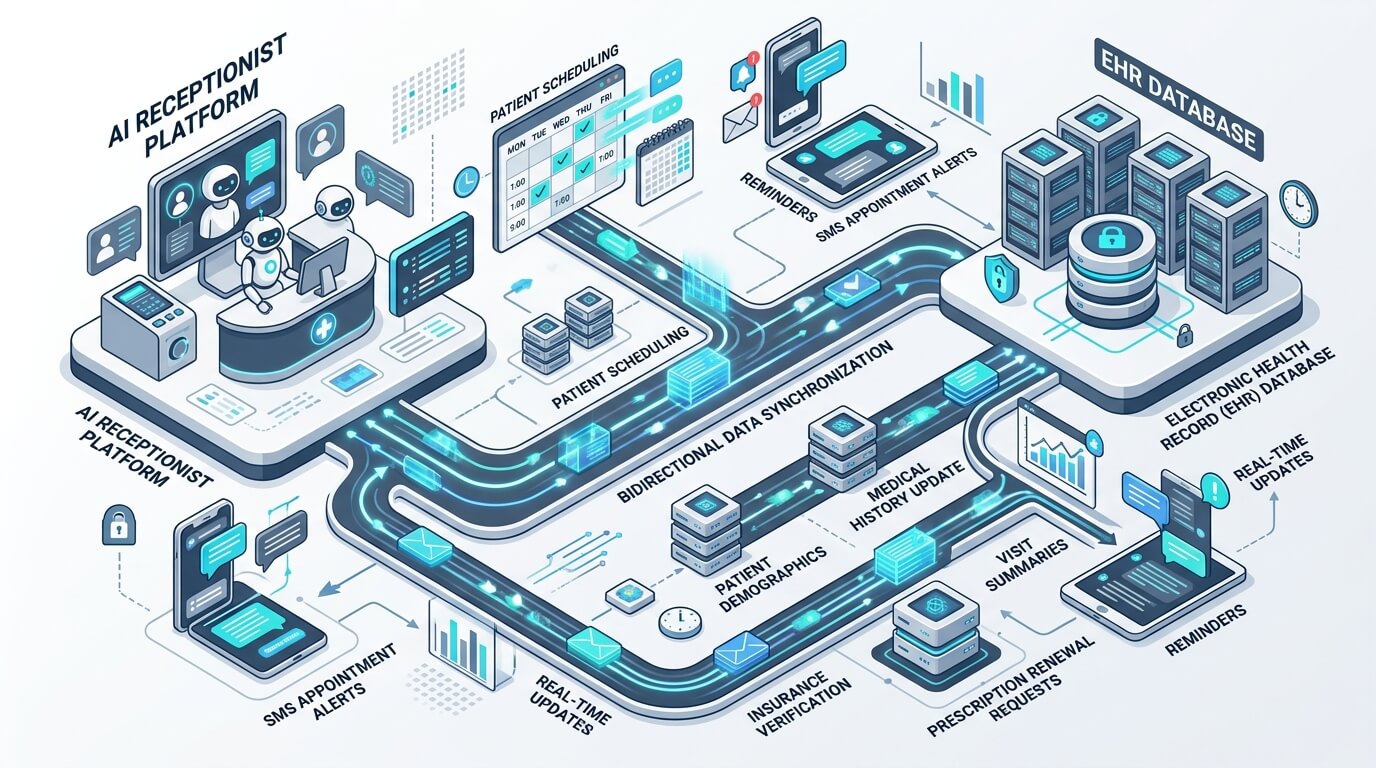
Unidirectional integration (read-only or write-only) creates data integrity risks that compound daily.
| Failure Mode | Scenario | Impact |
|---|---|---|
| Ghost Appointments | AI books in EHR, but EHR schedule changed (provider blocked time) | Patient arrives → no slot → trust destroyed |
| Double Bookings | Two AI agents book same slot simultaneously (no lock) | Two patients for one slot → clinical chaos |
| Stale Availability | AI shows slot from 5-min-old cache; slot filled in EHR | Patient books ghost slot → callback embarrassment |
| Orphan Records | AI creates patient in EHR but fails to link to chart | Duplicate patient records → billing denials |
LEVEL 3+ BIDIRECTIONAL FLOW (New Patient Booking):
API Integration vs. Screen Scraping: The Technical Reality
Proper EHR integration for AI receptionists hinges on this distinction. Screen scraping is not integration — it’s a fragile workaround.
| Aspect | API Integration | Screen Scraping (RPA/Bot) |
|---|---|---|
| Mechanism | Structured API calls (REST/FHIR) | Browser automation, DOM parsing |
| Reliability | 99.9%+ uptime, versioned contracts | Breaks on ANY UI change |
| Performance | <100ms typical | 5–30 seconds per operation |
| Security | Audit logs, OAuth 2.0 | Credentials stored, no audit trail |
The FHIR R4 Standard (What Good Looks Like)
FHIR (Fast Healthcare Interoperability Resources) is the modern standard for healthcare APIs. If a vendor uses OAuth 2.0 / SMART on FHIR, you are looking at a robust architecture.
| FHIR Resource | AI Receptionist Use Case |
|---|---|
Slot |
Real-time availability (read) |
Appointment |
Book, reschedule, cancel (read/write) |
Patient |
Demographics, matching, create (read/write) |
Coverage / Eligibility |
Insurance verification (read/write) |
How AI Reads Your Schedule to Prevent Double Booking
Double booking is the #1 scheduling nightmare. Deploying automated call workflows and checking our comprehensive AI medical receptionist guide reveals how clinics fill open slots instantly using deep EHR integration for AI receptionists.
How the AI Queries Availability (Real-Time)
Syncing Multi-Location Schedules into a Central AI System

For groups with 3+ locations, centralized AI scheduling is the force multiplier. Instead of siloed front desks managing local schedules, a unified schedule hub routes overflow dynamically.
| Rule Name | Trigger | Action |
|---|---|---|
| Primary Full | No slots at preferred location | Auto-offer nearest alternative with availability |
| Provider Preference | Patient wants specific provider | Check all locations for that provider |
| Central Waitlist | All locations full for timeframe | Add to central waitlist with location flexibility |
Automating Patient Data Between Marketing CRMs and Medical Systems
The gap between “marketing lead” and “medical patient” is where 40% of conversions die. An integrated AI agent bridges HubSpot/Salesforce directly into your EHR.
Customizing AI Scheduling Rules for Your Unique Calendar
Every practice has scheduling quirks. The AI must encode them as executable rules, not human memory.
- Provider Preferences: Time blocks, daily limits, location preferences.
- Visit-Type Rules: Durations, required forms, specific prep instructions, room routing.
- Patient-Level Rules: VIP flagging, repeat no-show buffers, pediatric guardian checks.
- Operational Rules: Schedule density targeting, overbook allowances, waitlist aggressiveness.
Voice-to-Text Clinical Note Integration: Eliminating Manual Entry

The final frontier: AI doesn’t just book — it documents. Using Medical ASR and Clinical NER (BioBERT/ClinicalBERT), the AI listens to the call and pushes a drafted SOAP note directly into the EHR for human sign-off.
| Clinical Element | Example Extraction | EHR Field |
|---|---|---|
| Chief Complaint | “Rash spreading for 3 days” | chiefComplaint |
| Medications | “Hydrocortisone 1% cream BID” | medicationStatement |
| Allergies | “NKDA” / “Penicillin – hives” | allergyIntolerance |
The 30–60 Day EHR Rollout Guide: Zero Downtime Implementation

Proper EHR integration for AI receptionists fails when treated as an “IT project” instead of clinical workflow transformation. Here is the blueprint.
Frequently Asked Questions
How long does EHR integration really take?
Sandbox: 1–2 weeks. Shadow mode: 1 week. Pilot: 2 weeks. Full rollout: 4–8 weeks. Total: 6–12 weeks for most practices. Single-vendor stacks (athena, eCW, NextGen) are 30–50% faster.
What if our EHR doesn’t have an API?
Then you don’t have integration — you have screen scraping. Accept no substitutes. If your EHR vendor won’t provide API access (FHIR or proprietary), you have three options: 1) Pressure the vendor (threaten to switch), 2) Use a middleware partner (Redox, Human API, Particle Health), 3) Plan EHR migration. Do not build on scraping.
How much does integration cost?
Technical integration: $15K–$50K one-time (vendor-dependent). Ongoing: included in AI platform subscription (typically $300–$1,500/mo). No per-transaction fees for API calls. Custom workflow development: additional.
Can we integrate with multiple EHRs/PMSs across locations?
Yes — this is standard for the platform. Each location’s PMS connects independently to the central AI hub. Unified patient matching (EMPI) handles cross-location deduplication.
What about FHIR vs. proprietary APIs?
FHIR is preferred (standardized, versioned, vendor-neutral). Most modern EHRs support FHIR R4 for core resources (Patient, Appointment, Slot, Schedule). Proprietary APIs used where FHIR gaps exist (complex scheduling rules, billing). The AI platform should abstract this — you shouldn’t care.
How do we handle provider credentialing/privileges in scheduling?
Rules engine encodes this. Each provider has a privileges object: locations, procedures, supervision requirements, state licenses. AI validates against these before offering slots. Credentialing updates → rule updates → instant propagation.
What if the AI makes a clinical scheduling error?
Impossible by design. The AI only schedules — it applies rules but never makes clinical decisions. Clinical triage (emergency detection) routes to human. Scheduling rules are deterministic and auditable. Every booking has a traceable rule path.
Can we test in our production EHR without risk?
Yes — sandbox first, then read-only shadow mode. Shadow mode runs against production data but never writes. You compare AI predictions vs. human actions for 1–2 weeks before any live booking.
What’s the rollback plan if things go wrong?
Instant. 1) Disable AI booking (single toggle). 2) Front desk resumes 100% scheduling. 3) All AI-booked appointments remain in EHR (valid). 4) Root cause analysis within 24 hours. Zero data loss, zero orphan appointments.
Ready to see how integration works with YOUR EHR?
Book a 30-minute technical deep-dive — we’ll review your stack, map the integration path, and give you a customized implementation timeline.